Short on time and always noodling the same old stuff?
Open Guitar Orbit and your session is already set up: the tab on screen, the backing track isolated, the metronome at yesterday's BPM. You sit down and play. Tab player, stem splitter, metronome, BPM control and much more — all in one app.





From guitarist to guitarists.
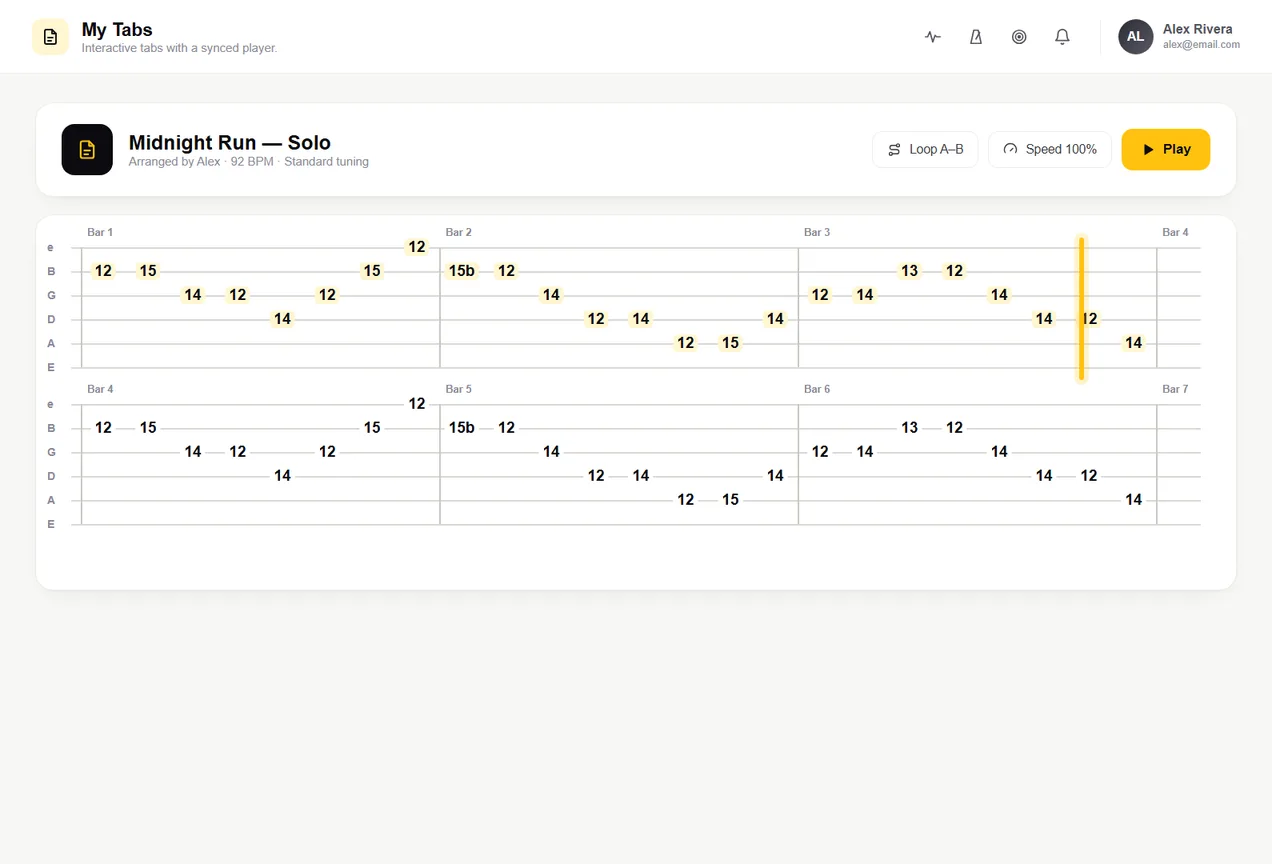
Click the menu items to look around — these are real app screens.Tap ☰ to open the menu and explore the real app.
Everything you need to level up on guitar
Each tool fixes something that holds you back. Tap each one to see.
The tab plays, teaches and becomes an exercise
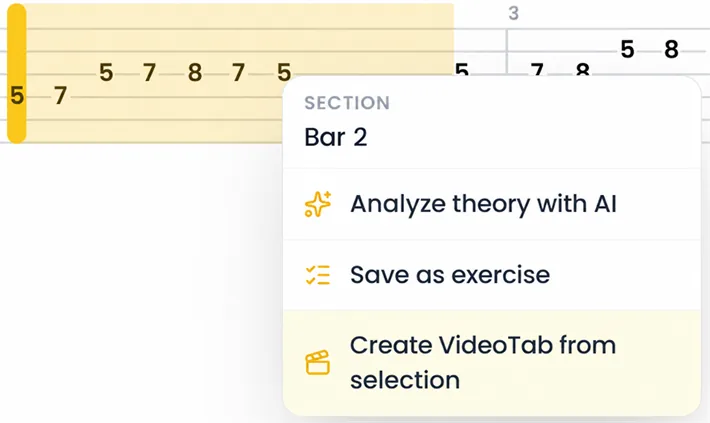
That part you always get stuck on? Isolate it, slow it down and loop it until your fingers get it. And if the theory confuses you, the AI explains just the part you selected.
- Play at your own pace — slow down and repeat the hard bar
- Stuck on theory? The AI explains just what you select
- Any section becomes an exercise with a BPM goal
And that's not all, there's much more…
What no other guitar tool does
From the riff you record to the video you post — features tab sites and YouTube playlists never had.
Your tab becomes a video ready for Instagram
Record your solo, export the scrolling tab with a transparent background and drop it over your video. What used to take two programs and hours of editing now takes one click — something no other tool does.
- Video tab with cursor and transparent background
- Just overlay it on your video and post
- Grow on social media showing what you play
Came up with a riff? Record it before you forget
A mini studio inside the app: record the idea on the spot, stack layers, import audio and watch the sketch turn into a song. No DAW to open, no lost inspiration.
- Record and stack layers instantly
- Import audio and build your mix
- Export the finished idea to share
That tone you can never find
Name the song or the tone you want and the AI builds the pedal and amp chain with the exact settings — laid out just like your pedalboard. No more turning knobs in the dark chasing a sound.
- The AI builds pedals and amp for the sound you asked for
- Ready-made settings for your pedalboard
- From clean to heavy metal, the right tone instantly
Hit start and just play
Today's plan runs by itself: warm-up, theory, technique and improv, each block timed, one after another. You don't decide anything — just follow along and improve. No more "where do I start today?".
- Today's session is guided from start to finish
- Each block with the right amount of time
- Open, hit play and practice — no thinking
Sound familiar?
The struggles every guitarist has when practicing — and how Guitar Orbit fixes them.
"I memorized the scales, but when I improvise I freeze — I don't know where the notes are on the neck."
See the whole scale drawn on the neck, in any key and tuning. Click a note to hear it, isolate the area you want and "Play with me" lights up position by position. The fretboard stops being a mystery.
"I can play it slow, but when I speed up it all falls apart. And bumping the metronome up by hand is a pain."
Mark the section, set the starting and target BPM — and the loop speeds up by itself every pass. You just play; the app takes you from slow to fast without touching anything.
"I play the lick, but I have no idea why it works. I just memorize, I never understand."
Select any section and the AI explains the theory behind it: which scale, which note adds the color, why it sounds that way. You stop memorizing and start understanding what you play.
How you practice today × how you practice with Guitar Orbit
Same free hour. Different results.
Funk

Blues

Metal

R&B / Soul

Latin

Neo Soul
Jazz

Ballad

Country

Worship

Pop

Reggae

Electronic
Funk
Blues
Metal
R&B / Soul
Latin
Neo Soul
Jazz
Ballad
Country
Worship
Pop
Reggae
Electronic
Jazz
Ballad
Country
Worship
Pop
Reggae
Electronic
Funk
Blues
Metal
R&B / Soul
Latin
Neo Soul
Jazz
Ballad
Country
Worship
Pop
Reggae
Electronic
Funk
Blues
Metal
R&B / Soul
Latin
Neo Soul
Ready-made backing tracks to play over
Dozens of original backing tracks by genre and key. Pick a style, hit play and improvise in a real musical context — from blues to metal. Apply what you practiced and play like the band is right there.
- Tracks by genre and key
- Improvise in a musical context, not in a vacuum
- From blues to metal, always the right vibe
And there's even more
Tools built for players who really want to improve.
What you create doesn't stay with you
Wrote a lick you're proud of? Publish it to an online player and send the link to anyone — friends, followers, anybody. They open it, play along and practice your lick right in the browser, nothing to install. From your bedroom to anywhere, with one link.
- Every lick gets a page with an interactive player
- Share the link with friends or your audience
- Anyone can play it in the browser, no account needed
And this is just the beginning — what you build here will grow into much more soon.
How much would it cost separately for all of this?
One plan. Everything unlocked.
Pay once a year and get every tool. Your account is created right after checkout.
Guitar Orbit Annual
Everything you need to keep improving, no limits.
That's just $3.08/month · billed once a year
Get Guitar Orbit now →- Interactive tab player + AI + any section becomes an exercise
- Stem splitter + Guitar Studio
- Tab editor + lick library (with AI)
- Study paths, schedule and backing tracks
- AI tone builder, fretboard explorer and IRs
- Unlimited tabs and ideas
- All future updates included
30-day money-back guarantee. Try everything. If it's not for you, ask for a full refund within 30 days.
Frequently asked questions
Still have a question? Just write to us.
Ready to really level up?
Get instant access to every tool. 30-day money-back guarantee.